Function compositions
Function compositions are a special case of openOBD functions that define a recipe of functions that need to be called one after another.
An openOBD Composition is a Python class that inherits the functionality of the OpenOBDComposition class.
The construction is exactly the same as for an openOBD Function. It also has the fields id, signature, name etc.
The difference between a composition and a regular function is that a composition defines a sequence of other openOBD functions to execute.
Create a second script (VW dummy)
First, we create a dummy VW script that we can call depending on the outcome of our EOBD script that we already defined.
Create a vw.py script in the myfunctions folder with the following content:
from openobd import *


class VWScript(OpenOBDFunction):

    id = ""
    signature = ""
    version = "v0.1"
    name = "VW Script"
    dashboard = False

    def run(self, **kwargs):
        logging.info("This is a VW script")

        if kwargs.get('VIN'):
            logging.info(f"We got the VIN as well ({kwargs.get('VIN')})")
Create an openOBD composition
Now, we will make a composition of our EOBD script and our VW script.
In the myfunctions folder we create a composition script with the following content:
from openobd import *

from myfunctions.eobd_reader import EOBDReadVIN
from myfunctions.vw import VWScript


class MyComplexVINReader(OpenOBDComposition):

    id = ""
    signature = ""
    version = "v0.1"
    name = "Complex VIN Reader"
    description = ""

    def run(self):
        result = self.function_call(EOBDReadVIN)
        logging.info(f"We got the following result: {result}")

        if "VIN" in result:
            if result["VIN"].startswith("W") or result["VIN"].startswith("J"):
                logging.info(
                    "This is a VIN from a Volkswagen, start the VW script")
                self.function_call(VWScript, VIN=result["VIN"])
            else:
                logging.info(
                    "This is not a VIN from a Volkswagen, we have no script available for this car"
                )
This composition will first run our EOBD reader and then dependening on the result it will start the VW dummy script.
Run the composition from the dashboard
- Make sure all your scripts (EOBD reader, VW dummy script and composition script) are created in the
myfunctionsfolder. - Register a fixed
idandsignatureand fill out these values in your scripts. - Note: In the VW dummy script we added the property
dashboard: False, which indicates that the function should not be visible in the dashboard - Serve your functions (so they will appear in your dashboard) by running:
python -m openobd serve --modules myfunctions
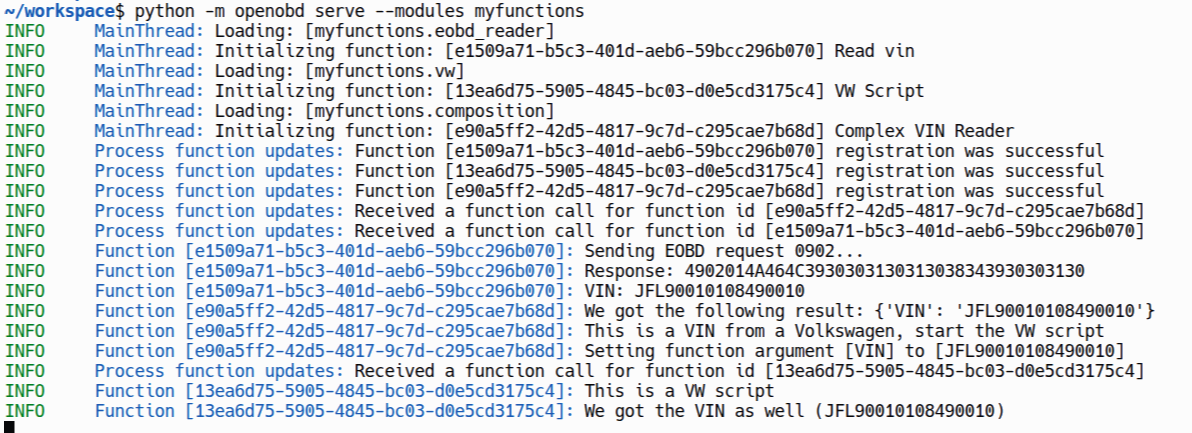
When you run your composition from your dashboard, the application in your Replit account should have a log that looks something like this:
Congratulations 
This completes the setup of your first openOBD hosting setup. It is wise to look into a reliable way of hosting your openOBD functions. This can be done by setting up a dedicated server that hosts your functions. Also, we have made a Java example implementation that you might want to check out.